Preparing SVGs
If you're making your own SVGs — or picking them off the internet — a little care in how they're drawn makes the difference between artwork that behaves like a real SimpleDiagrams shape and artwork that just sits there looking sullen.
The short version: outlines should be strokes.
For copyable SVG source, paint-role metadata, and the shared desktop/web authoring rules, see SVG structure and metadata.
Strokes versus filled outlines
An SVG can make the same visible outline using either a stroke or a filled shape. The two approaches can look identical with solid colours, but behave differently when you change their colours or apply a texture. These simplified panels show how each approach is built.
1. Real strokes: a path with a line width
A stroke paints a line along a path. The SVG specifies the line's colour and width separately from the surface's fill — for example, a black stroke around a white-filled panel.
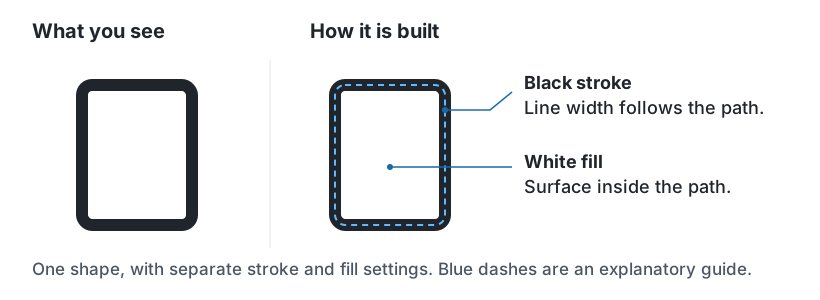
When converted: SimpleDiagrams links the stroke to your line colour and the surface to your fill colour. If you texture the surface, there is no solid black backing underneath it to show through the gaps.
2. Filled outlines: areas that look like lines
A filled outline is an area of colour whose visible edge looks like a line. Auto-tracing and commands such as Expand Stroke or Outline Stroke can produce artwork like this: the apparent line is stored as filled geometry, with no stroke width.
One way to build it is to cover a large black shape with a smaller white shape, leaving only a narrow black border visible. That is how the traced server in the comparison below is built. The illustration pulls those layers apart so you can see what is hidden.
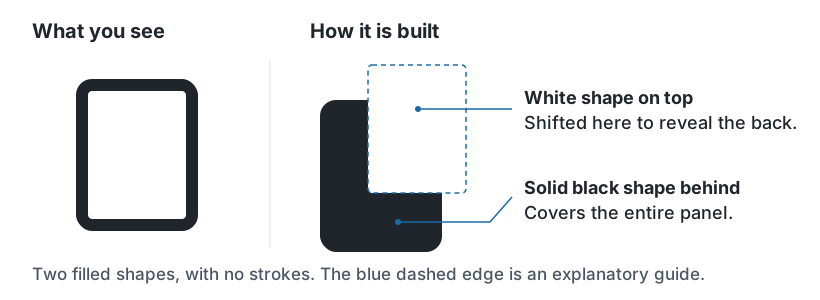
When converted: with no strokes to identify, SimpleDiagrams guesses from the colours: darker fills become line colour and lighter fills become surface colour. A drawing in one single colour has nothing to compare, so nothing is guessed: all of it follows the fill colour, starting black. The black backing remains a whole filled shape, even though it now uses your line colour.
Not every filled outline has a solid backing. Some are narrow bands with an empty centre. They still lack an explicit stroke, but the texture problem below is specifically caused by overlapping fills with a solid backing.
Why it matters
Convert to Editable Shape changes how the artwork responds to your line colour, fill colour and texture choices. It does not rebuild filled outlines as real strokes or remove hidden backing shapes.
With a solid surface fill, both approaches can look right because the surface hides anything underneath. A hatched texture has transparent gaps, so the construction becomes visible. Here are two server drawings with the same texture and colours:
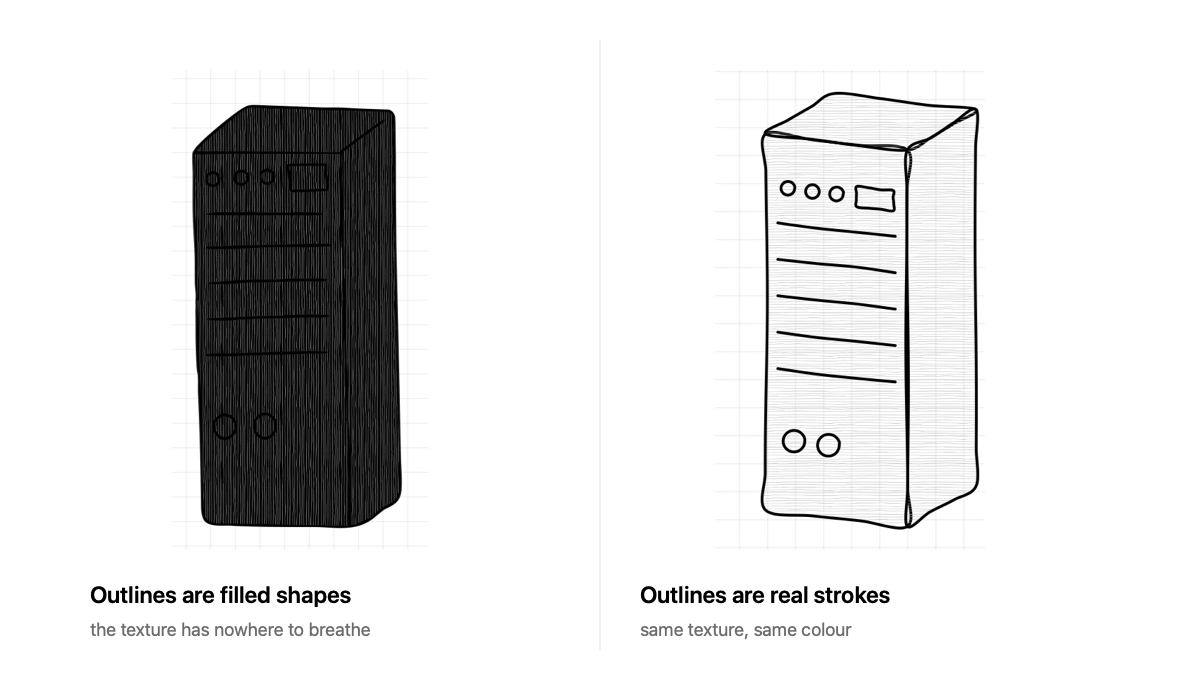
- Left — filled outlines (approach 2): the gaps reveal the dark backing shape beneath the surface, so the server looks almost solid.
- Right — real strokes (approach 1): the gaps reveal the page behind the server, while the outline stays around the edges. The hatching remains clear.
That is why real strokes are the best starting point for artwork you want to recolour and texture. If your file relies entirely on fills, the import window warns that conversion will have to guess:
This artwork's outlines are filled shapes, not strokes, so its colours can't be linked reliably. Keep as SVG Artwork for the best result.
You can still convert it. Try your intended colours and textures before relying on the result, or choose Keep as SVG Artwork to preserve its authored appearance.
Drawing SVGs that convert well
- Use strokes for lines. In Affinity Designer, Illustrator, Sketch or Inkscape, draw with the pen or line tool and give it a stroke weight.
- Don't expand or outline your strokes before exporting. That's the one command that turns a good file into the other kind. If your export preset does it automatically, turn that off.
- Use fills for surfaces. A face, a panel, a background — those should be filled shapes. Put a surface's fill and outline on the same closed drawable, so conversion can identify both reliably.
- Give the file a
viewBox. It's how the app works out the artwork's real size.width="100%"is fine as long as there's a viewBox to fall back on. - Convert text to outlines if the exact lettering matters, or expect it to be left out.
A quick way to check
Import it and read the Convert card, then try different fill and line colours. No warning does not guarantee correct paint mapping: the filled-outline warning checks whether the entire drawing lacks strokes, so a mixed file can still have problems. If you get the "filled shapes, not strokes" note, the drawing relies entirely on fills, which may be intentional or may come from traced or expanded outlines.
What gets left out
Conversion rebuilds your drawing as SimpleDiagrams paths, so anything it can't rebuild is dropped rather than blocking the import. Gradients, filters, masks, text and embedded images all fall in this bucket. The import window lists what went missing before you choose.
Housekeeping the app fixes silently, because nobody needs to hear about it: vendor
junk like xmlns:serif or inkscape:label, the <!DOCTYPE> line, and percentage
sizing when a viewBox is present.
What's always refused
Some things aren't a matter of taste. An SVG with scripts, event handlers, embedded HTML, animation, or links to anything outside the file itself won't import at all, in either mode. Same for entity declarations and references to things on the network.
SVG is a format that can contain running code. This one doesn't run it.
Embedded images
A PNG or JPEG embedded inside an SVG is refused too — not because it's dangerous, but because it would sneak past the metadata stripping that Import Image does. Import the picture separately and it gets cleaned properly.
When in doubt
Keep as SVG Artwork. It preserves exactly what the artist drew, it accepts far more kinds of file, and you can still move, resize, rotate and connect it. You only give up having it follow your colour and texture choices.
Converting is for when you want the artwork to follow your SimpleDiagrams colours and textures. Real strokes make that mapping reliable; filled outlines need a closer check.