Settings
SimpleDiagrams ▸ Settings… — Cmd+,.
It's a short window. That's on purpose.
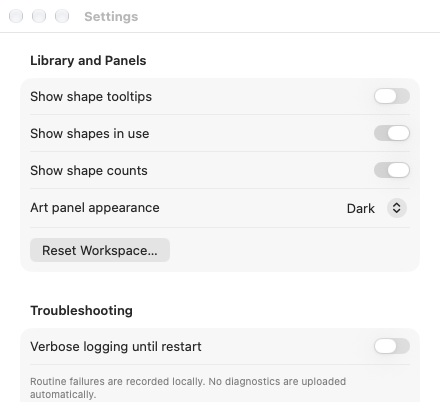
Library and Panels
| Setting | Default | What it does |
|---|---|---|
| Show shape tooltips | Off | Hover a shape in the Library panel to see its name. Complex-shape tiles, the ones wearing a ✱, show theirs even with this off, because the tooltip is what explains the ✱. |
| Show shapes in use | On | Adds an In Use section listing shapes already on the current page. |
| Show shape counts | On | The "N shapes" number beside each library heading. |
| Show shape groups | On | Libraries that sort their shapes into groups, such as BPMN and UML, show each group under a small heading. Turn it off to see every library as one block of shapes. |
| Panel appearance | Follow System | The Tool Palette and other panels follow your Mac's light/dark setting by default; choose Light or Dark to override it. |
| Library background — Light | #F5F5F5 |
The Library's surrounding background when panels use Light appearance. |
| Library background — Dark | #292A2A |
The Library's surrounding background when panels use Dark appearance. Dark shape cells use a lighter #424343 base colour. |
Both colour controls start at the app defaults and apply immediately. Restore Library Backgrounds restores both colours. These choices affect the Library, not the artwork or exported diagrams.
Reset Workspace… puts every panel back where it started — position, size, order, and the tool palette placement. It asks first, and it doesn't touch your diagrams or your Library display choices.
Use it when you've dragged something somewhere strange and can't undo your way out.
Canvas
| Setting | Default | What it does |
|---|---|---|
| Scroll to pan | On | Scrolling with a trackpad, a Magic Mouse or a scroll wheel moves around the diagram. |
| Show drop shadow on notes and cards | On | A very slight shadow under every note from Notes and Cards, on the canvas and in exports. It's a choice for this Mac and isn't saved in your diagrams. |
Turn it off if your Magic Mouse or trackpad keeps moving the diagram when you only meant to rest a finger on it. Space-drag still pans, and Cmd-scroll still zooms, whichever way it's set. See Panning.
Connectors
| Setting | Default | What it does |
|---|---|---|
| Show ending buttons on a selected connector | On | Select a connector and a small button appears beside each end. Click it to pick that end's ending. |
| Show endings when right-clicking an endpoint | On | Right-click the start or end of a connector and that end's endings are at the top of the menu. |
| Delete connectors when deleting shapes | Off | Deleting a shape also deletes every connector attached to it. |
| Hop over lines behind | Off | Where a straight run of a connector crosses a connector behind it, it passes over in a small arc, on the canvas and in exports. See Hops and rounded corners. |
| Round right-angle corners | Off | Right-angle connectors turn in a small curve, on the canvas and in exports. |
The first two are shortcuts, and the hop and corner settings belong to this Mac, not to a diagram. With either shortcut off you can still change endings from the Shape Properties panel, or from Start Ending and End Ending in the right-click menu. See Connectors.
With Delete connectors when deleting shapes off, a connector is its own object: deleting a shape leaves its connectors where they were drawn, no longer attached to anything, and you delete a connector by selecting it. Undo puts the shape and the attachment back. The setting changes Delete only. Cut, Copy and Duplicate always act on just the shapes and connectors you selected.
Marker
| Setting | Default | What it does |
|---|---|---|
| Show grain in marker ink | On | The slightly uneven, papery surface inside a marker stroke. |
| Darken the edges of marker ink | On | The darker rim where ink gathers at the edge of a stroke. |
| Pool ink where the marker rests | On | The darker spot where the tip lands, lifts or lingers. |
These change how every marker stroke looks on this Mac, on the canvas and in exports. They don't change your diagrams. Turning the grain off speeds up diagrams with lots of large marker strokes. See Pencil and Marker.
Troubleshooting
| Setting | Default | What it does |
|---|---|---|
| Verbose logging until restart | Off | Records more detail while you reproduce a problem. Resets when you quit. |
Routine failures are recorded locally. Nothing is uploaded automatically — the app has no network access at all.
Export Diagnostics… writes a SimpleDiagrams-Diagnostics.json file you can send me
if something's gone wrong. Before it saves, it tells you exactly what's in there: app
and macOS versions and event codes. No diagram content, no file names, no personal
information.
Language
You won't find this one in the Settings window. SimpleDiagrams speaks English and Japanese, and it simply follows your Mac. Set your Mac to Japanese and the menus, panels, Settings, alerts and the built-in libraries' shape names all turn up in Japanese. Anything else, and you get English.
Want a different language just for SimpleDiagrams? Open System Settings ▸ General ▸ Language & Region, scroll down to Applications, add SimpleDiagrams and pick a language. Quit and reopen SimpleDiagrams to see it.
Search doesn't mind which you use: the Library finds a built-in shape by its English name or its Japanese one.
Your diagrams don't change language when the app does. A diagram keeps whatever you typed into it, and built-in shape data, such as BPMN's fields, is saved in English and shown in your language. So a colleague on an English Mac opens your diagram and sees exactly the same shapes and data, just with English menus around them. CSV exports and copied tables use your language; JSON exports always use English, because programs read those.
Downloaded and custom libraries stay in the words their authors chose.
That's the lot
There isn't a sixth section. Most things that would be preferences in another app are per-document settings instead, which means they travel with the file:
- Grid look, spacing and whether it shows — View ▸ Grid Settings…
- Page size and DPI — Page ▸ Output Size…
- Background — Page ▸ Background…
- Default fill, stroke and text colours — click a colour chip with nothing selected
Panel positions are workspace preferences, rather than document content. Drag a panel or use Window ▸ Panels ▸ [panel] to show, hide, dock, or float it.