Pages
One document can hold up to 100 pages. Each page has its own artwork, its own background and its own output size. Think of them as tabs, or as slides if you're planning to present.
The Pages panel
Open it with Cmd+Alt+1.
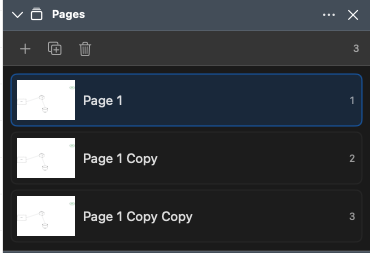
Along the top: Add Page, Duplicate Page, Delete Page, and a page count. Below that, every page with a live thumbnail, its name and number.
| Action | How |
|---|---|
| Switch page | Click it |
| Rename | Double-click the name, type, press Enter |
| Reorder | Drag the row — a blue line shows where it'll land |
| Duplicate, move or delete | Right-click the row |
From the Page menu
| Command | Shortcut |
|---|---|
| New Page | Cmd+Shift+N |
| Duplicate Page | Cmd+Shift+D |
| Rename Page… | — |
| Delete Page | — |
| Move Page Up / Move Page Down | — |
| Previous Page | Cmd+Alt+Page Up |
| Next Page | Cmd+Alt+Page Down |
| Background… | Cmd+Alt+B |
| Output Size… | Cmd+Alt+P |
| Present Pages | Cmd+Alt+Enter |
Delete Page is greyed out when there's only one page left, because a document with no pages would be a strange thing to own.
Output size
The canvas is infinite, so a page has no fixed size until you decide it needs one. Page ▸ Output Size… (Cmd+Alt+P) is where you decide.
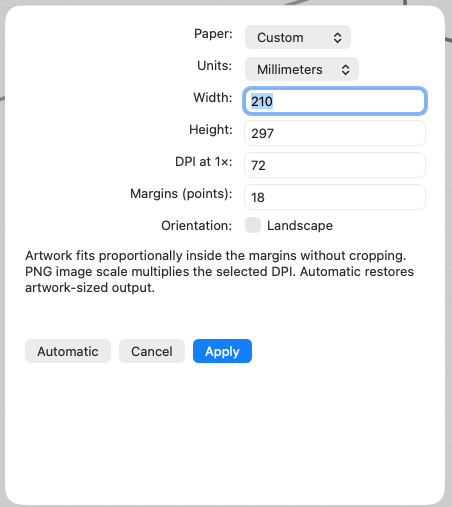
| Setting | Options |
|---|---|
| Paper | Custom, A4, US Letter |
| Units | Millimeters, Inches, Points, Pixels |
| Width / Height | Whatever you need |
| DPI at 1× | 1 to 2400, default 72 |
| Margins | 0 to 720 points, default 18 |
| Orientation | Landscape checkbox |
Defaults are A4 portrait at 72 DPI. Type decimals the way your Mac's region writes
them: 8.5, or 8,5 where the decimal mark is a comma.
The Automatic button throws all that away and goes back to "size the output to whatever artwork is actually on the page", which is the right answer most of the time. Set a fixed size when you're printing, or when a diagram has to drop into a document at an exact size.
Output size is per page, so a document can hold an A4 page and a wide slide side by side.
Export frames
If you only want part of a page to leave the app, select the objects you care about and choose Page ▸ Set Export Frame to Selection. Exports and prints of that page will use those bounds instead of the artwork bounds.
Page ▸ Clear Export Frame puts it back to automatic.
Backgrounds are per page
Each page carries its own background, so a document can mix a chalkboard, a napkin and plain white without complaint. See Backgrounds.
Presenting your pages
Cmd+Alt+Enter opens a clean full-screen window and steps through the pages with the arrow keys. See Presenting.